


Simple Floral Watch Face
4.746.00 Reviews
App Specs
- Version
- Varies with Device
- Updated On
- License
- $1.49
- Downloads
- 10,000+
- Developer
- Monkey's Dream
- Categories
- Personalization
- Platform
- Android
Screenshots
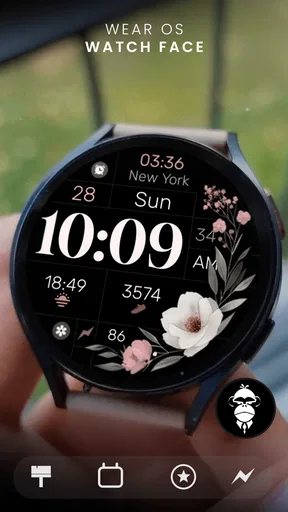
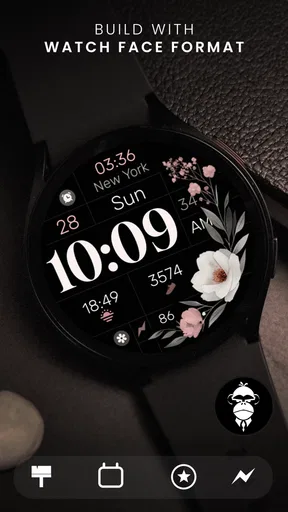
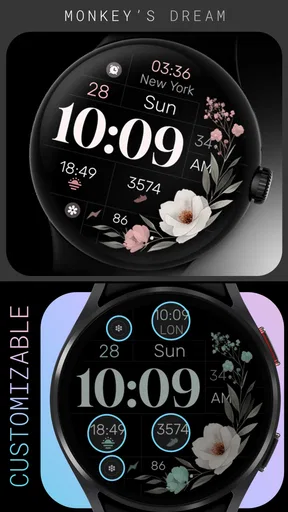
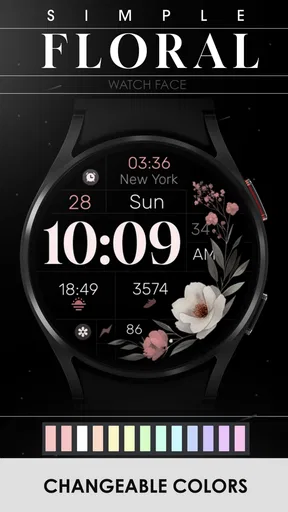
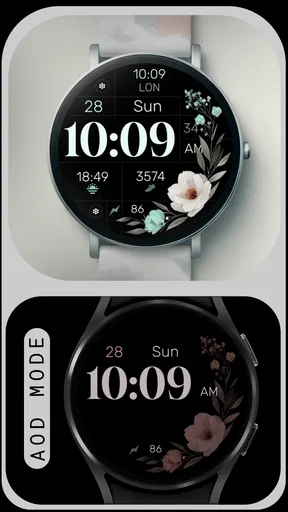
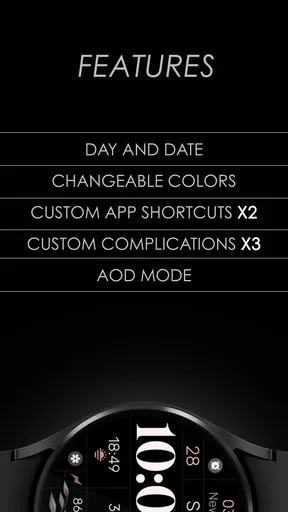
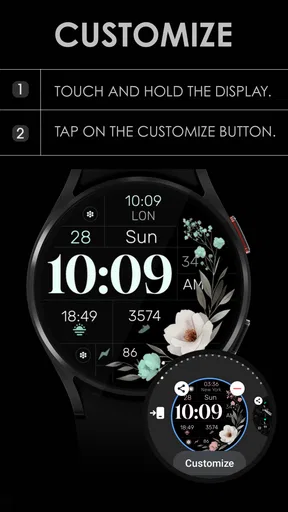
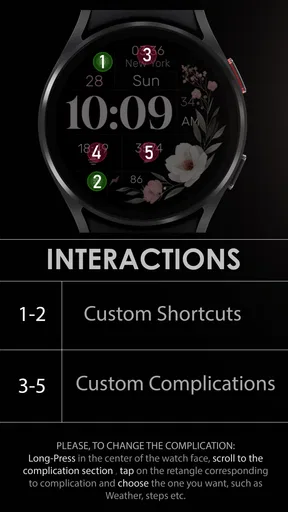
 Analysis by AppCompare
I like watch faces that improve the way a smartwatch looks without turning the screen into a dashboard. Simple Floral Watch Face takes that quieter approach. It is a Personalization app from Monkey's Dream for Wear OS, built around a floral visual style rather than a crowded collection of tools. After spending time with it, I see the appeal: it gives a compatible watch a softer, more decorative identity while keeping the overall presentation modern and restrained.
The important thing is to approach it as a watch-face purchase, not as a full smartwatch utility. You are choosing a visual layer for your wrist, with customization and appearance doing most of the work. That makes it especially interesting for someone who finds standard digital faces too plain but dislikes the busy look of information-heavy alternatives.
A floral design that stays practical on the wrist
The first impression is deliberately calm. The floral theme adds personality without looking like a novelty costume, so I can imagine wearing it with casual clothes, office clothing, or a more dressed-up outfit. Its modern styling helps it avoid the old-fashioned feel that some decorative watch faces can have. At the same time, the design remains simple enough that the watch still feels like a watch rather than a tiny poster.
That balance matters more than it may seem. A face can look attractive in a store preview and become tiring after several days if the time is difficult to read or the decoration competes with the essentials. Here, the restrained direction is the main strength. I found myself judging it less as a piece of digital artwork and more as something I could leave enabled throughout the day.
The app is sold for $1.49, which places it in the inexpensive paid-watch-face category. I prefer that model for a focused personalization item because the decision is straightforward: pay once, install it, and decide whether the visual treatment suits your watch. There is no need to treat it like a large app subscription or a long-term service commitment.
Monkey's Dream has positioned this release for a broad audience, and the Everyone content rating fits that purpose. It was released on Jan 24, 2024, and the listing describes it as a simple floral watch face for Wear OS. Those details point to a focused product rather than an app trying to become a general-purpose smartwatch companion.
What customization means in everyday use
The word “customizable” is important here, but I would keep expectations sensible. The attraction is the ability to adapt the face to your own taste, not to build an entirely new design from individual components. When I consider a watch face like this, the useful question is whether the available choices help it fit different situations: a brighter or quieter look, a style that works with a particular strap, or a layout that remains comfortable to read at a glance.
Worth Reading Before You Choose

EA SPORTS FC Mobile 26 Is a Bigger Football Game, but It Takes Time

Flipboard Shows What News Apps Must Do Beyond the Feed

Switching to Android Auto Means Rethinking Your Driving Routine

Google Calendar Makes a Crowded Week Easier to Manage

Ludo King Makes the Most of the Minutes Between Plans

Baby Panda World Brings Quick Play to Modern Phones, but Its Game Library Feels Busy
A practical way to set it up is to begin with legibility rather than decoration. Put the face on your watch, check it in daylight, then look at it indoors and while walking. A floral background can be attractive when the screen is still, but movement and reflections change how quickly the time stands out. I would also compare it with a dark strap and a light strap before settling on one configuration. That small test can reveal whether the design feels balanced with the rest of the watch.
Another useful habit is to create a default look for normal days and a second look for occasions when appearance matters more than instant information. This is where a decorative face can earn its place: not necessarily as the only face on the device, but as the one I select when I want the watch to feel more like an accessory. Switching between a clean utility face and this floral design gives the purchase more value than leaving it installed but never using it.
I would not choose it for a workflow built around constant glanceable data. If your main reason for wearing a smartwatch is to see several metrics at once, a face designed around complications and dense information will probably be more useful. Simple Floral Watch Face makes more sense when the watch should look polished first and informative second.
Trust starts with a narrow purpose
For me, trust begins with understanding what an app is supposed to do. This one has a narrow role: personalize the appearance of a Wear OS watch. That limited purpose is reassuring because it gives me a clear reason to install it. I am not expecting a social feed, a health platform, messaging tools, or an account-based ecosystem from a product like this.
That does not mean I would install it without looking at the Android permission screen. Before confirming any watch-face installation, I check the permissions shown by the operating system and read the wording rather than assuming that a decorative app needs broad access. I also review the developer name, Monkey's Dream, so the item I install matches the product I intended to buy. These are simple checks, but they are especially worthwhile when an app is connected to a wearable.
The store shows an average rating of 4.7 from around 405 ratings, with 46 written reviews. I treat that as useful context rather than a guarantee. A high score suggests that many people liked the visual result, but watch faces are unusually personal: screen shape, display technology, strap choice, and reading habits can change the experience. I would still inspect the screenshots and make my decision based on whether the design suits my own watch.
The app has passed the 10K+ installs mark, which gives it a real user base without making it feel like an anonymous, mass-market utility. That is a modest but meaningful sign that people are actively trying it. Still, popularity cannot answer the questions that matter most to a privacy-conscious user, such as what the installation requests or how much control the user has over optional behavior. Those checks belong in the installation process.
Checking controls before and after installation
My preferred setup process is deliberately cautious. I first confirm that the watch runs Wear OS and that the store page is for the correct product. Then I review the purchase screen, the developer identity, the content rating, and the permissions presented by the phone or watch. Once installed, I look through the watch-face picker and the customization screen rather than accepting every option automatically.
This is also the moment to notice whether a choice is genuinely optional. If a setting changes the appearance, I want an obvious way to change it again. If the operating system presents a permission request, I want to know what feature would need it before granting access. A clear user choice is more valuable to me than a long feature list, especially for a visual app that should not need to manage my wider digital life.
I also recommend checking the app’s entry in Android settings after installation. The goal is not to disable something blindly, but to understand what the system allows you to control. If you later stop using the face, removing it should be as easy as selecting another face and uninstalling the companion app through the normal system controls. I prefer this reversible approach: try the design, keep it if it works, and remove it cleanly if it does not.
One trade-off is that a very simple watch face may offer fewer ways to tailor the experience than a larger customization suite. That is not automatically a flaw. Fewer choices can make setup faster and reduce clutter, but users who want detailed control over every color, data field, or visual element may find the boundaries frustrating. I would decide whether that trade-off is acceptable before paying, using the preview and the visible customization options as the main evidence.
Where privacy questions matter most
A watch face sits in a data-sensitive environment even when its main job is visual. The watch itself may be connected to notifications, health information, location services, contacts, and other personal functions. That is why I separate the face from the rest of the wearable system. I do not assume that installing a personalization app gives it a reason to access unrelated information, and I do not grant a request merely because the app is attractive.
The most important moment is the first setup. I read every permission prompt, watch for requests that do not appear connected to changing the face, and use Android’s controls to make an informed decision. If the system offers a choice between allowing something while in use, allowing it more broadly, or denying it, I choose the narrowest option that still supports the function I actually want. If a feature stops working, I can then decide whether that feature is worth expanding access for.
I also avoid linking unrelated accounts to a watch-face app unless there is a clear reason. A decorative face should be evaluated on what it visibly does on the watch, not on promises that require handing over additional personal details. Keeping the installation limited to the watch-face purpose reduces the number of decisions I have to make and makes the app easier to remove later.
There is a practical privacy benefit to using a face like this as an occasional style choice. I can switch to it when I want the floral look and return to a utility-focused face when I need more information. That separation helps me think clearly about which face is active and what I am using the watch for at that moment. It is not a replacement for reviewing permissions, but it is a sensible way to keep personalization from becoming confused with health or communication functions.
How it fits a normal day
Imagine a weekday morning when I am getting ready for work. I want the watch to look coordinated with a simple outfit, but I do not want to spend several minutes adjusting a complicated design. A floral face can make the watch feel intentional without requiring a separate accessory. During the commute, I can glance at the time, then switch back to a more information-dense face when I need frequent access to other watch functions.
At lunch or after work, the same face works differently. It becomes less about productivity and more about matching the setting. That flexibility is one of the strongest reasons to consider it. The app does not need to dominate the day to be useful; it can serve as a visual mode that I select when the watch’s appearance matters.
There is also a good use case for people who have stopped wearing their smartwatch because it looks too technical. A floral design can soften that impression and make the device feel closer to a traditional accessory. I would especially consider it for someone who likes understated patterns, wants a modern feminine touch, or finds most sporty faces visually repetitive.
On the other hand, a person who checks the watch mainly for schedules, activity information, weather, or other at-a-glance details may prefer a face built around those needs. In that situation, the floral treatment could become an attractive distraction or simply leave too little room for the information that matters. Choosing this app means accepting that visual character is the priority.
Comparing it with the usual alternatives
The most obvious alternative is the standard face already included with a Wear OS watch. That option is convenient, familiar, and often better integrated with the device’s information controls. If you only need a clear time display and do not care about changing the watch’s personality, the built-in choice may be enough.
Another alternative is a highly configurable face from a larger watch-face catalog. Those products often appeal to users who want extensive control over complications, colors, layouts, and multiple information zones. They can be better for turning the watch into a compact control panel, but they may also take longer to configure and can look visually crowded. Simple Floral Watch Face is the more appealing choice when I want a finished aesthetic with customization that does not become a project.
Free faces are also worth considering. They remove the $1.49 purchase decision, which matters if you change styles frequently or are only experimenting with floral designs. The paid option becomes easier to justify when the particular artwork fits your taste and you prefer a focused experience over browsing through many nearly identical alternatives. I would not pay simply because the category is attractive; I would pay because this specific visual direction works with my watch and wardrobe.
There is a final alternative: using a photo or a manufacturer-provided decorative background. That can be more personal, but it may not have the same finished composition as a purpose-designed face. A floral watch face gives me a ready-made look without needing to prepare an image myself. The trade-off is that I am choosing the developer’s design language rather than creating something completely individual.
Who should install it, and who should pass
I would recommend it to someone who wants a calm, decorative Wear OS face, values a modern floral style, and prefers a small personalization purchase over a complicated customization system. It is also a good candidate for users who want a second face for social occasions, weekends, or outfits where a technical-looking screen feels out of place.
I would be more cautious about recommending it to someone who expects extensive data controls, a large collection of layouts, or a productivity-first display. If every glance needs to show several pieces of information, a utility face will likely be the better tool. I would also suggest checking compatibility and the available preview carefully before buying, because the same design can feel very different on different watch displays and case sizes.
For privacy-minded users, my recommendation is conditional but practical: install only after reviewing the permissions shown by the operating system, keep optional access limited, and revisit Android settings if the app’s behavior changes. The narrow purpose is a positive starting point, but responsible use still depends on the choices made during setup. I would not treat a good rating as a substitute for those checks.
My final take
Simple Floral Watch Face succeeds because it knows what it wants to be. It gives a Wear OS watch a softer, more distinctive appearance without forcing the user into a complicated utility package. I appreciate the modern floral direction, the approachable price, and the fact that the app belongs to a clear personalization category rather than trying to do too much.
Its limitations are tied to the same simplicity that makes it appealing. Users looking for a dense information hub or deep, technical customization should compare it with a more configurable face. Users who care about trust should inspect permissions and system controls during installation instead of assuming that a decorative app is automatically low-risk.
My cautious verdict is positive: I would recommend it when appearance is the main reason for changing a watch face and when the visible customization choices match your taste. I would treat it as a stylish second option rather than an all-purpose replacement for a data-focused face. For the right Wear OS owner, that focused role is enough to make the purchase worthwhile.
Pros
- Clean floral design is easy to read at a quick glance.
- Uses minimal visual clutter
- keeping the watch face elegant.
- Works well for casual outfits and everyday wear.
- Offers a softer alternative to sporty or data-heavy watch faces.
- Simple layout is suitable for users who prefer a calm appearance.
Cons
- May feel too plain for users who want detailed watch information.
- Floral artwork may not match professional or athletic styles.
- Limited visual variety can make the face feel repetitive over time.
- Small details may be difficult to appreciate on compact screens.
- Compatibility may depend on the smartwatch platform and model.
FAQs for Simple Floral Watch Face
What is Simple Floral Watch Face?
Simple Floral Watch Face is a decorative watch-face app designed to give a compatible smartwatch a clean, nature-inspired appearance. It typically combines a floral background or motif with essential information such as the time, and may offer a choice of colors or layouts depending on the device and app version. Its main appeal is its simple, elegant style rather than a large collection of advanced tools.
Which devices are compatible with Simple Floral Watch Face?
Compatibility depends on the version of the watch-face application and the operating system used by your smartwatch. Before downloading, check the store listing for supported platforms, watch models, screen formats, and required companion apps. Some watch faces are intended for Wear OS devices, while others may work only with a particular smartwatch ecosystem. Compatibility should be confirmed before installation.
Can I customize the floral design or displayed information?
Customization options can vary considerably. Some versions may let you change the floral theme, accent colors, background appearance, or the information shown around the clock, while others provide a fixed design with only basic settings. After installation, open the watch-face settings through the companion watch app or the watch itself to see which options are available for your specific model.
Does Simple Floral Watch Face affect battery life?
Like any active watch face, Simple Floral Watch Face can have a small effect on battery consumption because it keeps the display updated and may use additional visual elements. The impact is usually modest when the design is static and optimized, but it can be greater on watches with bright screens, always-on display enabled, or frequent complications. Battery performance may also vary by device.
How do I install and set Simple Floral Watch Face?
Installation normally begins by downloading the app from the official Android or iOS store, depending on the supported platform. You may need to connect it with a compatible smartwatch application, grant the requested permissions, and then select the watch face from your device’s available designs. If it does not appear immediately, check the Bluetooth connection, restart the companion app, and verify compatibility.


